// Screenshots
At Home on Every Desktop
The same widget in the Ubuntu top bar, the macOS menu bar and on the Windows taskbar, each with its menu open. Click any shot to enlarge.
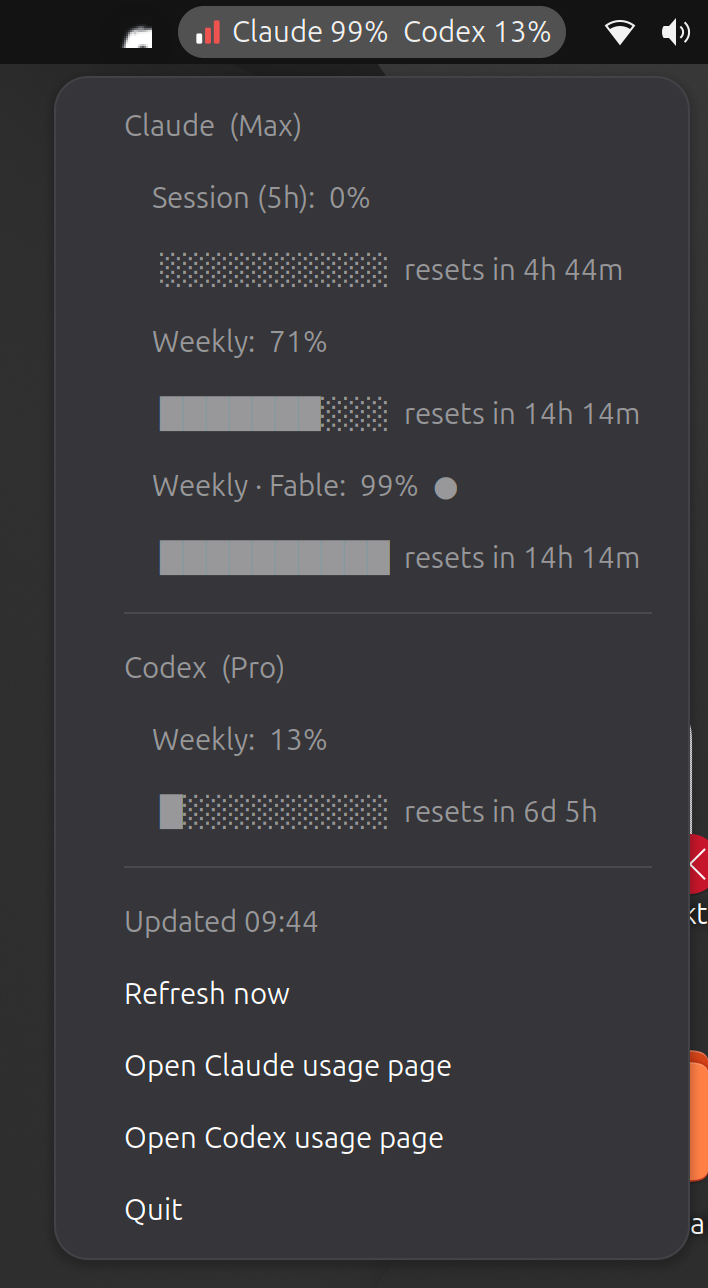
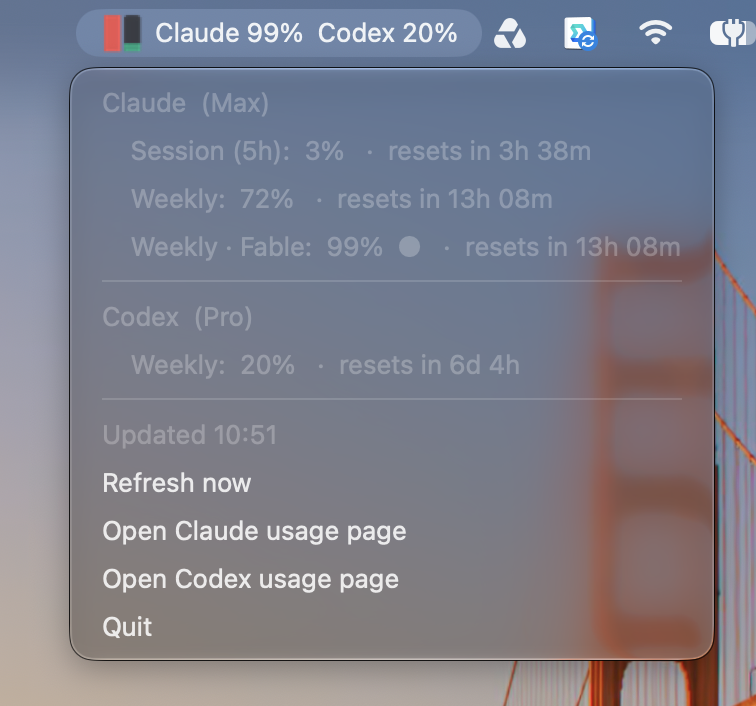
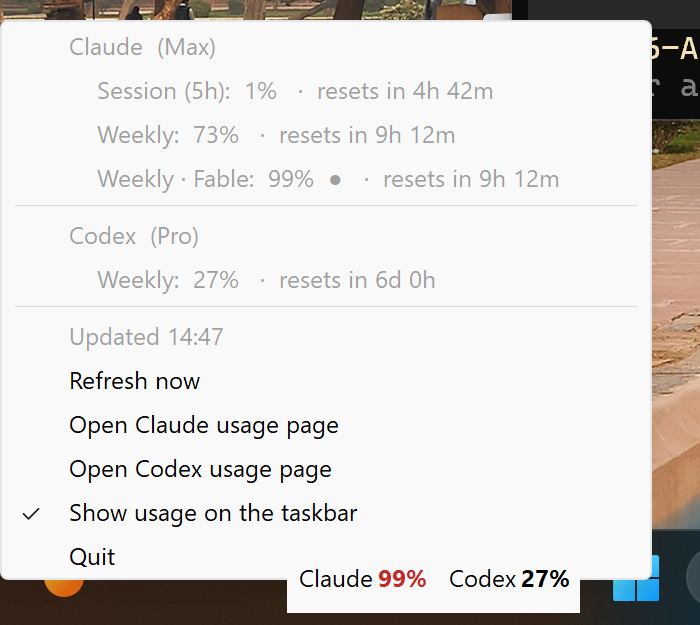
LLM Usage Widget puts your Claude and Codex plan usage where your system status icons live: the session and weekly windows, model-scoped limits and a countdown to each reset, one glance away in the top bar, menu bar or taskbar.
Nothing to configure: it reuses the logins Claude Code and the Codex CLI already keep on your machine, only ever reads them, and sends each token only to the provider that issued it. Free and open source under the MIT license.
No more opening a terminal to type /usage halfway through a task. The widget keeps the numbers next to your clock and tells you how long until each window resets.
A compact Claude 99% Codex 13% readout in the Linux top bar, the macOS menu bar, or drawn right on the Windows taskbar, in the next empty gap, never over your buttons.
Click for the full list: the 5-hour session, weekly windows and model-scoped limits, each with its percentage, a bar and the exact time until it resets.
Bars and icons turn amber at 70% and red at 90%, or follow the severity the provider reports. If a refresh fails, the last numbers stay up, marked stale.
Once a plan hits 100% and usage credits remain (Claude's extra usage or a Codex credit balance), the readout switches to what's left, like Claude 75% left.
Pick Stop Claude at 90% and the widget stops running claude CLI processes when the plan reaches it, then clears itself. Credit cutoffs cap extra spend the same way.
Log in to claude and codex once and you're done. Credentials are only read, never modified, and the widget never refreshes tokens, so it can't log your CLI out.
Running the CLIs on a cloud instead of a subscription? See spend against your budget, month-to-date cost and today's tokens from your existing AWS, Google Cloud or Azure login.
On macOS and Windows, settings and cutoffs sync through iCloud Drive and OneDrive, even between a Mac with only iCloud and a PC with only OneDrive.
No tray? Run an always-on-top floating window instead. Want the numbers out of sight? Collapse to logo shows just the Aleph Void ℵ₀ mark until you click.
The same widget in the Ubuntu top bar, the macOS menu bar and on the Windows taskbar, each with its menu open. Click any shot to enlarge.
The widget asks each provider the same question the official CLIs ask for their own /usage and /status screens, using the login you already have.
Claude Code's credentials from the macOS Keychain or ~/.claude, and the Codex CLI's from ~/.codex/auth.json. Cloud sections use your AWS, gcloud or az login.
Each token goes only to the provider that issued it, over HTTPS, with redirects rejected and response sizes bounded. Nothing passes through an Aleph Void server.
Refreshes every 3 minutes (or every minute, if you like), then updates the readout, the colored icon and the menu. One copy runs at a time and starts with your session.
Run claude → /login and codex login once with your subscription.
Run the installer for your OS. It starts right away and at every login.
Your usage appears next to the clock. Click it for every limit and reset.
Optionally, stop the CLI at a percentage or a credit amount you choose.
Claude and Codex subscription limits out of the box. If your CLIs run on a cloud instead, the matching section turns on by itself from Claude Code's or Codex's own settings.
| Provider | Shows | Credentials from |
|---|---|---|
| ClaudePro, Max, Team | Session and weekly windows, model-scoped limits, extra usage | Claude Code: macOS Keychain or ~/.claude/.credentials.json |
| CodexChatGPT plans | Plan windows and credit balance | Codex CLI: ~/.codex/auth.json |
| Amazon Bedrockincl. bedrock-mantle | AWS Budget, month-to-date spend, tokens today | Your AWS profile, SSO or environment, via boto3 |
| Google Vertex AI | Tokens today, month-to-date spend, budget | Application Default Credentials (gcloud auth application-default login) |
| Azure OpenAI& Microsoft Foundry | Azure budget, month-to-date cost, tokens today | az login, or azure-identity |
Cloud billing data is cached and fetched at most every 6 hours by default, so AWS Cost Explorer costs about $1.20 a month. Billing can lag by a day, so treat it as a dashboard, not a spending alarm.
Free, for every platform. macOS builds are signed with a Developer ID and notarized by Apple; Windows installers are Authenticode-signed. No Python needed on macOS or Windows.
Latest release on GitHub
Every installer starts the widget right away and again at each login.
All releases & release notes →
It's a single Python script. Clone the repository and use the install scripts, or run it directly. Other desktops (Fedora, Arch, KDE, XFCE, Cinnamon) use ./install.sh.
# Linux / macOS: install, with login autostart
git clone https://github.com/aleph-void/LLM-Usage-Desktop-Widget.git
cd LLM-Usage-Desktop-Widget && ./install.sh

# Windows: double-click install.cmd

# Or just print your usage in the terminal
python3 usage_widget.py --once
Read every line that touches your credentials, file an issue, or add a provider: write a fetch_<name>() and its tests. The suite runs on Linux, macOS and Windows against Python 3.9 to 3.14, with no network and no real logins.
Yes. LLM Usage Widget is open source under the MIT license, with no paid tier, account or license key. If it saves you a surprise lockout, you can sponsor Aleph Void on GitHub.
No. The widget reads the login that Claude Code (claude) and the Codex CLI (codex) already store on your machine. Log in to each once with your subscription and it works. An API-key Codex login has no plan limits to show; use codex login with ChatGPT.
Credentials are only read, never modified, and each token is sent only to the provider that issued it, over HTTPS with redirects rejected. The widget never refreshes tokens itself, because rotating a refresh token would log your CLI out. The code is open for you to check.
Claude Code and Codex refresh their own tokens while you use them. If you haven't used one for a while, its access token can expire. Open that CLI once and the widget picks up the new token on its next refresh.
On the first refresh that finds a provider at or over its cutoff, the widget stops every running process of that provider's CLI (claude or codex), leaves a note in the menu and turns the cutoff off so you can start again. The Claude and Codex desktop apps are never stopped. Usage is checked on each refresh, so a busy session can go slightly past the cutoff.
Any panel with AppIndicator / StatusNotifierItem support. Ubuntu's GNOME works out of the box; on other GNOME setups enable the "AppIndicator and KStatusNotifierItem Support" extension. KDE, XFCE, Cinnamon and others work too, though some panels show only the icon. For desktops without a tray, run the floating window with --widget.
Windows has no API for text on the taskbar, so the widget uses a small window that follows it. After Start, Search or the Widgets board, Windows 11 can leave the taskbar in a layer no ordinary program can draw over, until the shell resets it. The tray icon and its tooltip still show the numbers meanwhile.
It might. The widget uses the same internal endpoints the official CLIs use for their /usage and /status screens, which are undocumented. If a provider shows an error after an update, a new release usually follows quickly, and the widget tells you when one is out.
No analytics or telemetry. Apart from the providers you use, it only asks GitHub once a day whether a newer release exists. See the Privacy Policy.
No. LLM Usage Widget is an independent project by Aleph Void LLC and is not affiliated with or endorsed by Anthropic, OpenAI, Amazon, Google or Microsoft.